Search This Website

Showing posts with label PAN CARD. Show all posts

Saturday, 8 October 2022

How to Download and Print

How to Download and Print


How to Download and Print 

To download the PAN card, applicants have to provide Aadhaar and residential address. It is necessary for an Indian citizen to download the Form 49A PAN card. And for foreign entities the 49AA form has to be filled. Applicants who wish to download PAN card can download through NSDL or UTIITSL portal. They can also download PAN card through mobile app with just a simple process and few taps.


Scroll down and get the details of downloading PAN card.

PAN Card Download Online NSDL

1. First of all you have to go to the official site of NSDL portal.

2. Now click on Download e-PAN Card (Download e-Pan Card / e-Pan XML for PAN alloted older or more than 30 days), which will be found on the homepage.


3. Enter your PAN number, Aadhaar number, date of birth and GSTN (if applicable).


4. Now read the captcha code carefully and enter it on the box provided.

5. Now click on submit for OTP process.

6. OTP will come on your registered mobile number and email id.


7. Select as per your choice and click on Generate OTP.


8. Now enter OTP and click to validate.

Then you have to pay 8.26 Rs...


Then after that the payment confirmation message will be in front of you.


9. After the verification process is over, click on “Generate PDF”.

10. Downloaded PDF format of e-PAN card is password protected..


11. And password is your date of birth. Please mention your date of birth to use your e-PAN card.

12. A fee of 8.26 is applicable for downloading e-PAN card.


Nowadays downloading PAN card is a simple and easy process for Indians and NRIs.

You can download your PAN card through both web portals. In which you have to enter unique 10 digit alphanumeric number. Which is mandatory for financial transactions according to Income Tax Department.

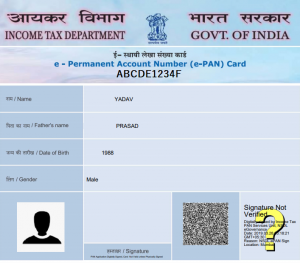
Following details are mentioned in an ePAN card:

  • Permanent Account Number
  • Name
  • Father’s Name
  • Date of Birth
  • Gender
  • Photograph
  • Signature
  • QR Code

PAN Card Download Online UTIITSL

1. Visit the official site of the UTIITSL portal. Click Here

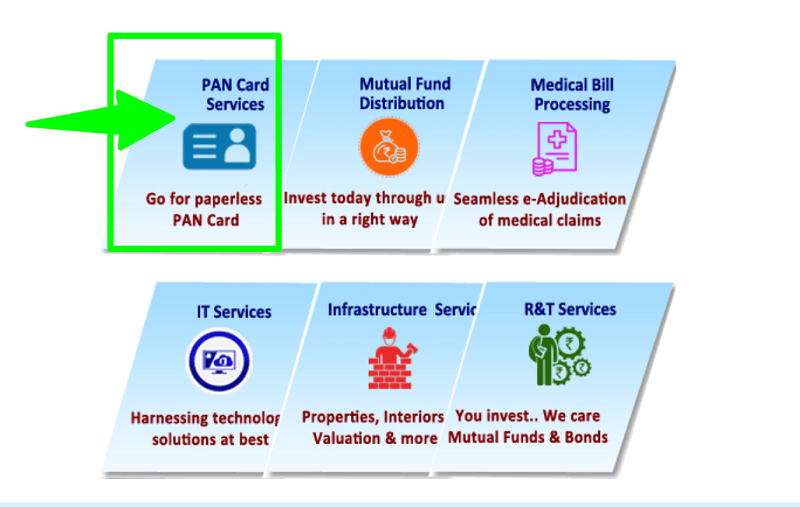
2. Now click on PAN card services.

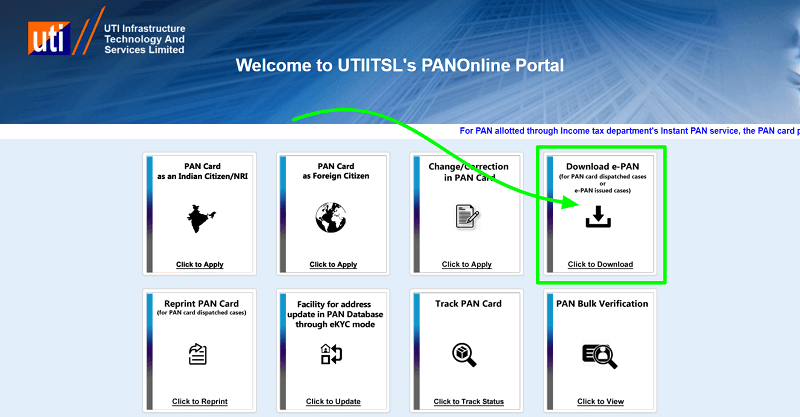
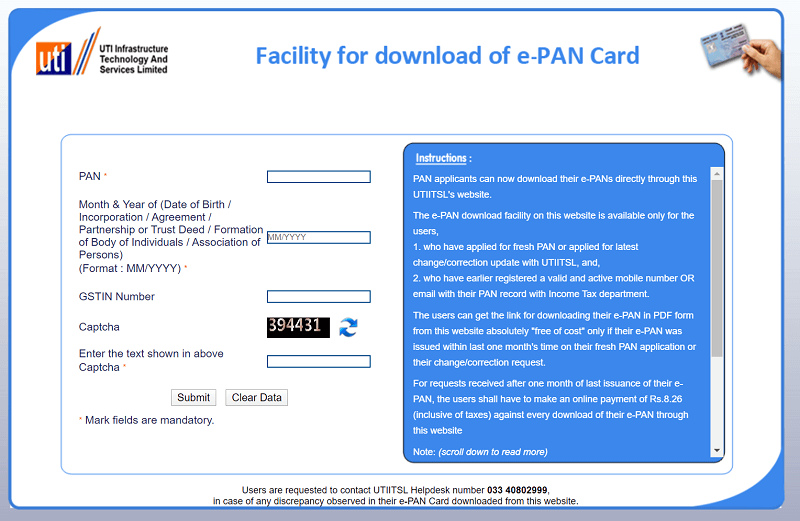
3. Now click on download e-PAN, enter your PAN number, Aadhaar number, date of birth and GSTN (if applicable)


4. Now read the captcha code carefully and enter it on the box provided.
5. You will now be directed to a new page.


6. Enter your 10 digit alphanumeric PAN number
7. Enter your date of birth for your documents
8. Enter GSTIN number if required
9. Read the captcha code carefully and enter it on the box provided.
10. Review all your available details and click submit.
11. Now a link will be given to your registered mobile number or email id.
12. Click on the link and you can download the e-PAN card using OTP.
13. No, no fee is applicable for downloading e-PAN card

Read More »

Friday, 20 July 2018

How To Change Old Sign In PAN Card?

How To Change Old Sign In PAN Card?

How to change old sign in PAN card?

We sign our important documents. License, Water ID, Aadhar Card, PAN Card, signature of this item is very important. Sometimes it happens that the signature is not correct due to the digital signature being made while creating the card and this signature does not match the signature at another important location.

Today, we will tell you in this article that you can change old sign in PAN card.

Change in the PAN card like this:

– To change their signature in the PAN card, you must first go to NSDL’s website https://tin.
tin.nsdl.com/pan/correctiondsc.html.

– After that you will scroll through the website and follow the following side by checking the category of the applicant and selecting it.

After selecting category, you will have to fill in the PAN application form along with a new signature.

Fill all the carefully read the entire form of the ManFactory field together with the truth, there will be an option in the form Signature Mismatch on which you will have to give a check.

You will also have to pay a fee of Rs 110 after paying the form. You can use debit, credit card and net banking. After submitting the form well, click on submissions.

In a paperless pen application, you can upload your photo, signature and document online and the documents do not require physical presentation and the PAN card signature conversion process will be completed here.

After completing all the procedure, upload all the documents, upload it to the option given along with the online form.

Online fill form will be printed, print out of the acknowledgment, all the required documents and signed two photo packs of passport size. Application for PAN Change Required – Enter the acknowledgment number. You have to send to this address. Income Tax Pen Services Unit, NSDL e-Governance Infrastructure Ltd., 5th Floor, Minister Sterling, Plot No. 341, Survey Number 997/8, Model Colony, Pune-411016.

click here to read in gujatati

Read More »

Saturday, 12 May 2018

How To Submit PAN Card Application Online

How To Submit PAN Card Application Online

How to Submit PAN Card Application Online

Our government has never been more digitally savvy than it is today, and that means that there are many important government functions that can be carried out online. A month ago, the government even launched a website to let all of us track the attendance of central government employees, and to see if they were arriving to work on time. With so many government services going digital, we believe that it’s important that our readers also know what can be done online, and how.

To start with, we’re taking you through the process of applying for a PAN card. In India, most important financial transactions require you to have a PAN card – it is used when opening a bank account, filing tax returns, or for financial transactions above Rs. 50,000. Having one of these cards is pretty much essential if you’re working and managing your own finances.

Applying for a PAN is simple, and you can fill the forms online, but you’ll have to mail your documents to the Income Tax PAN services offices to finalise the process. Once you fill up the form on the site and send your papers, the application is processed and the card shipped directly to your residential address.

In case you get stuck and need more information, then the helpline number (18001801961) is a good resource – when we got stuck on some of the details of the application, we gave them a call and found the service extremely helpful.

Step one is to get copies of the different documents you need to submit on your application.

Documents Required

To submit the application, you need to upload several documents to the PAN Services Unit website. You will need to upload a proof of identity, address and date of birth, along with a scanned passport photograph. Start by making a scan of any one document per section, for each section below:

Proof of identity
A copy of any one of these documents is acceptable as ID proof for a PAN card:

Aadhaar Card issued by the Unique Identification Authority of India

Elector’s photo identity card


Driving licence


Passport


Ration card having photograph of the applicant


Arms license


Photo identity card issued by the Central Government or State Government or Public Sector Undertaking


Pensioner card having photograph of the applicant


Central Government Health Service Scheme Card or Ex-Servicemen Contributory Health Scheme photo card


Certificate of identity in original signed by a Member of Parliament or Member of Legislative Assembly or Municipal Councillor or a Gazetted officer


Bank certificate in original on letter head from the branch (along with name and stamp of the issuing officer) containing attested photograph and bank account number of the applicant

Address proof

Along with your photo ID, you’ll also have to enclose an address proof in your application. Any of the following documents can be included with your form:

Aadhaar Card issued by the Unique Identification Authority of India

Elector’s photo identity card


Driving licence


Passport


Passport of the spouse


Post office passbook having address of the applicant


Latest property tax assessment order


Domicile certificate issued by the government


Allotment letter of accommodation issued by Central or State Government of not more than three years old


Property registration

Certificate of address in original signed by a Member of Parliament or Member of Legislative Assembly or Municipal Councillor or a Gazetted officer

Employer certificate in original

You can also use one of the following documents, if it is less than three months old:

Electricity bill


Landline telephone or broadband connection bill


Water bill


Consumer gas connection card or book or piped gas bill


Bank account statement


Depository account statement


Credit card statement

Proof of date of birth

A copy of any one of these documents should suffice as proof of date of birth:

Birth Certificate issued by the Municipal Authority or any office authorised to issue Birth and Death Certificate by the Registrar of Birth and Deaths or the Indian Consulate as defined in clause (d) of sub-section (1) of section 2 of the Citizenship Act, 1955 (57 of 1955)

Pension payment order

Elector’s photo identity card

Driving licence


Passport


Passport of the spouse


Post office passbook having address of the applicant


Latest property tax assessment order


Domicile certificate issued by the government


Allotment letter of accommodation issued by Central or State Government of not more than three years old


Property registration

Photographs

You will need two recent passport sized photographs for the PAN card application.

How to apply

Once you have scans of all these documents ready, simply do the following:

Go to this page on the NSDL website.

Scroll to the bottom and select Individual in the Apply for a new PAN Card drop down menu. Click on Select.

Now you can start filling the form. In case you have any doubts, visit this page for form filling guidelines.

The first field is AO Code, which you can look up here. You can also call the Income Tax department helpline at 18001801961 to find out about your AO code.

The other fields like name, gender, address, etc. are pretty self-explanatory, but remember to select the correct documents you will be submitting along with the application, from the drop-down window in point 15 on the form.

Once you’ve filled in all the details, select a payment method at the end of the form. The PAN card application fee is Rs. 105, but additional bank charges may apply depending on the payment method. If you want the PAN card sent outside India, the fee is Rs. 971. You can pay via demand draft, cheque, credit/debit card or net banking.

Click Submit when done.

Review all the details in your form. Make sure all spellings are correct and enter the captcha code, then click Confirm.

Now you’ll see a page with payment terms and conditions. Note down the transaction number at the top of the page and click Agree.

Complete the payment.

You’ll now see an acknowledgement form. This has a unique 15-digit acknowledgement number. Print this page.


Paste the two photographs on the printout of the acknowledgement (in the space provided). 


Sign within the box on the acknowledgement form.


Put this form in an envelope with the cheque or DD (if you haven’t paid online), and the required documents mentioned earlier.


On the envelope, write APPLICATION FOR PAN – ____. Fill in the blank with your unique 15-digit acknowledgement number.


Post it to NSDL at Income Tax PAN Services Unit, NSDL e-Governance Infrastructure Limited, 5th floor, Mantri Sterling, Plot No. 341, Survey No. 997/8, Model Colony, Near Deep Bungalow Chowk, Pune – 411016.


Your application must reach NSDL within 15 days from the date of online application. They’ll send the PAN card to your address after processing the application. You can call 02027218080 to check the status of your application.


View Official Website

Read More »

Tuesday, 26 December 2017

Can not cancel PAN card that does not linkto the support

Can not cancel PAN card that does not linkto the support

Can not cancel PAN card that does not linkto the support

Cannot cancel PAN card that does not link to thesupportSandesh December 4th 2017 03:18New Delhi,At present, the hearing is being heard on the Supreme Court challenging the government's orderto link the support card mobile number and bank accounts with the Supreme Court. A senior government official said, if the Supreme Court gives a verdict in favor of the government, the government will give 3 to 6 months time to link thesupport card.

After the expiry of the deadline, the government can cancel all non-linked papers. The official said that by canceling the un-linked pagecard, all the fake PAN cards will be removed from the system and the anonymous transactions will stop. At present, the Income Tax Department has kept the date of joining the Aadhaar card with the PAN card till December 31. The government has indicated in the Supreme Court that it wants toextend this deadline to March 31, 2018.The official said that if the Supreme Court decides in favor of agreeing with the government's stance of joining the pledgor with the papers and agrees with the proposed deadline, then the government can give an additional time of 3 to 6 months to linktaxpayers to the support card.The official said, we can give 3 to 6 months time to link support with Pan after 31st December.

If thepage is not linked to support after this deadline, then the PANcard will be invalid. Last month, the central government told the Supreme Court that it wants to extend the deadline for linking up to March 31. The government has mandated the number to get IT returns and a new PAN card from this year.

Income tax law says that on 1st July 2017, everyone who has a PAN card has to link the support number in the income tax department.With 33 million papers linked to 13.28 croresAccording to the official, by November 2017, out of 30 crore papers, 13.28 crore has been linked to the base. The exercise is done in the direction of abolishing the duplicate leaf and the support card used by the elements, rather than paying the tax in the remaining taxes.Fraudulent for a pirated economyThe official said that the fake papers are becoming scary for the economy. Opening of bankaccounts by bogus papers has financial transactions, but returns are not filed which is a worrying thing.

Read the original source

Read More »

Friday, 3 November 2017

Did you lose your PAN Card or misplaced it somewhere

Did you lose your PAN Card or misplaced it somewhere


To Apply Duplicate Pan Card

After completion of online form applicant should send the Signed Physical Copy of Pan Application, Identity proof, Address proof and Date of birth Proof to us To Apply Duplicate Pan Card

Pan Card Copy Will Not Be Accepted as Proof of Document

Our Service is subject to submission of forms to the pan authorities

To Apply Duplicate Pan Card

After submission of forms to the Pan Authorities, it is the pan authorities who will process your application and deliver the pan card; hence time may vary as per the application in processing the pan card

Applicant should not make any correction or changes to the downloaded duplicate application form

Click Here to apply Online

Read More »

Monday, 8 May 2017

PAN CARD NA NAME MA AADHAR CARD MUJAB SUDHARO KARVA NI ON LINE PADHHTI

PAN CARD NA NAME MA AADHAR CARD MUJAB SUDHARO KARVA NI ON LINE PADHHTI
Additionally, finance minister Arun Jaitley proposed that category I and II foreign portfolio investors (FPIs) should be exempted from taxation on indirect transfers, which made investors a happy lot. Both key indices Sensex and Nifty reclaimed their key levels of 28,000 and 8,700 for the first time, scoring their biggest single-day gain since October 2016. BSE Sensex on Wednesday rose 485.68 points, or 1.76%, to 28,141.64 while the Nifty 50 rises 155.10 points, or 1.81%, to 8,716.40 after finance minister Arun Jaitley’s budget speech

in This blog You Can find Lots of Study Materials for All Competitive Exams Preaparation Like Tet, Tat, Htat, Gsssb Police Constable, Talati, junior clerk Examsthe applicant take patience because Gujarat Subordinate Service Selection Board has much take a time to declared the result because it is not a easy task to declared the exam .It take some few day to declared the result . There are many process to declared the result .Candidate to have a request to stay and contact with us through the comment .And for detail read the complete passage for get the more detail.

we provide complete exam materials for various exam Like Tet,Htat,Tat,police exam,Clerk exam, Gpsc Exam,panchayatclerk exam and other Gujarat Level Exams.

From Web you can Get various Related Like General knowledge, Gujarat Totally General knowledge,English Grammar,Gujarati Grammar,Gujarati Literature,maths,science and other more materials For exams complete preparation stay connected.

educational website and here we given all types of Educational news . All Gujarati news papers educational news cuttings are put in this blog. we can add post from some leading gujarati news papers like Sandesh, Divya bhaskar, Gujarat samachar, Akila , Sanj samachar and many more.

We are happy to inform we put Latest and trusted Educational news from trusted sources.

so daily visit and stay connected with getting all type of news like Job, Result,CCC, Teachers related, All circulers, Admission, study material, GK,Question bank, and many more

 click here to Download Pdf file  

PAN CARD MUJAB SUDHARO

Read More »

Sunday, 5 March 2017

How to Create PAN Card 48 hours will receive...

How to Create PAN Card 48 hours will receive...

How to Create PAN Card 48 hours will receive...

We Daily Update Government Exam, Government Jobs, General knowledge, Any News, Technology News on
Give Gujarat and India Level All Type of New Government Exam, Government Jobs and Various Jobs,current affairs.....

Give Various Jobs Information Like Government Jobs, Graduate Jobs, Medical Jobs, Engineer Jobs, Law Jobs, MBA Jobs and Other Gujarat & India Level All Expansion.

This Site www.ojasjobinfo.in is Famous for All competitive Exams Material and Preparation. Our Team Provide Complete Exam Materials For All Gujarat Government Exam Like GPSC Exam, Police Exam, Tet Exam, Htat Exam, Tat Exam, Clerk Exam, Panchayat Clerk Exam and Other Gujarat & India Level Exam

- 48 hours will receive a PAN

Click Here For Read

Read More »

PAN Card Kya Hai Aur PAN Card Online Apply Kaise Kare

PAN Card Kya Hai Aur PAN Card Online Apply Kaise Kare

PAN Card Kya Hai Aur PAN Card Online Apply Kaise Kare

PAN card (permanent account number) ki importance kya hai, ye aap acchi tarah se janate honge. Aaj ki date me pan card hona jaruri ban gaya hai, Government (banking/financial/etc) se related kisi bhi kaam me pan card ki copy submit karne ki jarurat hoti hai. Isliye aaj hum janenge ki PAN card kya hai, aur Pan card ke liye online apply kaise karte hai.

▼▼PAN Card Kya Hai

★★PAN card bharat sarkar ke income tax department dwara jaari kiya gaya permanent account number (PAN) hota hai. Iss card me ITD dwara 10 digits ka alpha aur numeric account number taxpayer ko issue kiya jata hai jo ki puri tarah se unique hota hai. Applicant ko pan card banane ke liye form 49A bharkar submit karna hota hai, aur Iske liye 107 rupees ke lagbhag fees submit karni hoti hai. PAN card ke liye baccho se lekar senior citizen tak koi bhi apply kar sakta hai, isme age limit ki koi boundation nahi hai.

▼▼PAN Card Ke Liye Kya Kya Documents Chahiye

★★Photo of applicantPassportVoter ID CardRashan CardDriving License10th, Ya 12th certificateAadhaar CardElectricitiy/Water billTelephone billArms license

★★PAN Card Kya Hai Aur Kyu Jaruri Hai

★★Aaj PAN card ki importance bahut jyada badh gayi hai, kyuki bahut se financial transations aur sarkari kaam ke liye hume iski jarurat padti hai, jinme kuch examples niche diye gaye hai.

★★Direct tax paymentIncome tax department se kisi bhi taraha ke communication ke liyeProperty sale aur purchase ke liyeIncome tax return (ITR) file karne ke liyeVehicles four wheeler/two wheeler ko sale & purchaseHotel aur restaurants me 25 thousands se jyada bill payment ke liye50 thousand aur isse jyada RBI bond ke liye50 thousand or isse jyada fix dipositsMutual fund ki purchasing ke liyeForeign currency purchasingetc

▼▼PAN Card Kya Hai Aur PAN Card Online Apply Kaise Kare

▼Step 1

☞Sabse pehle uppar aapel link ya last ma aapel link par click kari website me jaye, aur Online PAN Application Click Here link par click kare.

▼Step 2

☞Ab ek form open hoga, isse bhare.

☞Application type me New PAN – Indian Citizen (Form 49A) select kare.Category select kare.Apna title select kare.Apna pura name bhare.Apni date of birth select kare.Agar email id hai to yaha bhare.Apna 10 digit ka mobile number enter kare.Captcha code enter kare.Submit button par click kare.

▼Step 3

☞Next window me request submit ka message aur ek token number aayega.

☞Kisi vajah se abhi register nahi ho to, iss token number se baad me bhi kar sakte hai.Continue with PAN Application Form button par click kare.

▼Step 4

☞Next window me guidelines tab open hoga, isme niche diye steps follow kare.

☞Apna aadhar number enter kare.Gender select kare.Agar aapka koi alternate name nahi hai to NO par tick kare.Fathers name enter kare.Mothers name enter kare, ye otional hai isse skip bhi kar sakte hai.Next button par click kare.

▼Step 5

☞Ab ek personal pan card details form open hoga, isse niche diye steps ke according bhare.

☞Apni source of income option par tick kare.Communication ke liye office aur residential me ek option choose kare.Apna ghar ka address bhare.Apne office ka name aur address enter kare.Country code select kare.Apna mobile number enter kare.Agar email id hai to yaha bhare, ya phir skip kar de.Representative assessee me No par tick kare.Next button par click kare.

▼Step 6

☞Ab next page me contact & other details bhare.

☞Indian citizens par tick kare.State name choose kare.Apni city ka name select kare.Apna area code select kare.Next button par click kare.

▼Step 7

☞Agle page me apne document ki detail enter karna hai. Yaha par aapko 3 option milte hai apni aaplication submit karne ke liye.

☞Sabhi documents ke sath application post submit karnaDocuments ko scan karke post karnaAadhaar card ko online verification karke submit karna

☞Upar diye gaye tino options me se aadhar card option best hai isliye (identity proof, address proof aur date of birth proof) tino 

dropdown me aadhaar card select kare. Agar aadhar card nahi hai to voter id card set kar sakte hai.Apna name enter kare.Place me apne city/state ka name likhe.date of birth select kare.Submit button par click kare.

▼Step 8

☞Submit button par click karte hi, aapki information submit ho jayegi, Ek baar pura form check kare aur proceed button par click kare.

▼Step 9

☞Ab next window me online payment method choose karna hai.

☞Online payment through bill desk par tick kare.Terms & condition par tick kare.Proceed to payment ke button par click kare.

▼Step 10

☞Ab jo next page open hoga isme pay confirm button par click kare.

▼Step 11

☞Pay confirm button par click karte hi, next window me payment option open hoga.

☞Koi bhi ek payment option choose kare.Apne card detail bhare.Make payment button par click kare.

☞Iske baad Rs. 107 ki payment karni hai, payment successful hone ke baad aapko ek acknowledgement receipt milegi, iska printout nikal kar apne paas rakh lijiye. Next step me acknowledgement printout ki slip ko apne nearest PAN card center me submit kar dijiye.

☞PAN card center me slip ko submit karne ke baad aap PAN card status ke iss link par click karke, aur apna 15 digit ka acknowledgment number dalkar apne pan card status ko online track kar sakte hai.

☞Agar aapne pan card form aur document sahi se submit kiya hai to aapki pan card application form verification ke ek mahine ke ander aapka pan card aapko mil jayega Itne step.......
Click here to apply online

Read More »

Sunday, 29 January 2017

PAN Card Kya Hai Aur PAN Card Online Apply Kaise Kare

PAN Card Kya Hai Aur PAN Card Online Apply Kaise Kare

Click here to apply online
PAN Card Kya Hai Aur PAN Card Online Apply Kaise Kare

PAN card (permanent account number) ki importance kya hai, ye aap acchi tarah se janate honge. Aaj ki date me pan card hona jaruri ban gaya hai, Government (banking/financial/etc) se related kisi bhi kaam me pan card ki copy submit karne ki jarurat hoti hai. Isliye aaj hum janenge ki PAN card kya hai, aur Pan card ke liye online apply kaise karte hai.

▼▼PAN Card Kya Hai

★★PAN card bharat sarkar ke income tax department dwara jaari kiya gaya permanent account number (PAN) hota hai. Iss card me ITD dwara 10 digits ka alpha aur numeric account number taxpayer ko issue kiya jata hai jo ki puri tarah se unique hota hai. Applicant ko pan card banane ke liye form 49A bharkar submit karna hota hai, aur Iske liye 107 rupees ke lagbhag fees submit karni hoti hai. PAN card ke liye baccho se lekar senior citizen tak koi bhi apply kar sakta hai, isme age limit ki koi boundation nahi hai.

▼▼PAN Card Ke Liye Kya Kya Documents Chahiye

★★Photo of applicantPassportVoter ID CardRashan CardDriving License10th, Ya 12th certificateAadhaar CardElectricitiy/Water billTelephone billArms license

★★PAN Card Kya Hai Aur Kyu Jaruri Hai

★★Aaj PAN card ki importance bahut jyada badh gayi hai, kyuki bahut se financial transations aur sarkari kaam ke liye hume iski jarurat padti hai, jinme kuch examples niche diye gaye hai.

★★Direct tax paymentIncome tax department se kisi bhi taraha ke communication ke liyeProperty sale aur purchase ke liyeIncome tax return (ITR) file karne ke liyeVehicles four wheeler/two wheeler ko sale & purchaseHotel aur restaurants me 25 thousands se jyada bill payment ke liye50 thousand aur isse jyada RBI bond ke liye50 thousand or isse jyada fix dipositsMutual fund ki purchasing ke liyeForeign currency purchasingetc

▼▼PAN Card Kya Hai Aur PAN Card Online Apply Kaise Kare

▼Step 1

☞Sabse pehle uppar aapel link ya last ma aapel link par click kari website me jaye, aur Online PAN Application Click Here link par click kare.

▼Step 2

☞Ab ek form open hoga, isse bhare.

☞Application type me New PAN – Indian Citizen (Form 49A) select kare.Category select kare.Apna title select kare.Apna pura name bhare.Apni date of birth select kare.Agar email id hai to yaha bhare.Apna 10 digit ka mobile number enter kare.Captcha code enter kare.Submit button par click kare.

▼Step 3

☞Next window me request submit ka message aur ek token number aayega.

☞Kisi vajah se abhi register nahi ho to, iss token number se baad me bhi kar sakte hai.Continue with PAN Application Form button par click kare.

▼Step 4

☞Next window me guidelines tab open hoga, isme niche diye steps follow kare.

☞Apna aadhar number enter kare.Gender select kare.Agar aapka koi alternate name nahi hai to NO par tick kare.Fathers name enter kare.Mothers name enter kare, ye otional hai isse skip bhi kar sakte hai.Next button par click kare.

▼Step 5

☞Ab ek personal pan card details form open hoga, isse niche diye steps ke according bhare.

☞Apni source of income option par tick kare.Communication ke liye office aur residential me ek option choose kare.Apna ghar ka address bhare.Apne office ka name aur address enter kare.Country code select kare.Apna mobile number enter kare.Agar email id hai to yaha bhare, ya phir skip kar de.Representative assessee me No par tick kare.Next button par click kare.

▼Step 6

☞Ab next page me contact & other details bhare.

☞Indian citizens par tick kare.State name choose kare.Apni city ka name select kare.Apna area code select kare.Next button par click kare.

▼Step 7

☞Agle page me apne document ki detail enter karna hai. Yaha par aapko 3 option milte hai apni aaplication submit karne ke liye.

☞Sabhi documents ke sath application post submit karnaDocuments ko scan karke post karnaAadhaar card ko online verification karke submit karna

☞Upar diye gaye tino options me se aadhar card option best hai isliye (identity proof, address proof aur date of birth proof) tino 

dropdown me aadhaar card select kare. Agar aadhar card nahi hai to voter id card set kar sakte hai.Apna name enter kare.Place me apne city/state ka name likhe.date of birth select kare.Submit button par click kare.

▼Step 8

☞Submit button par click karte hi, aapki information submit ho jayegi, Ek baar pura form check kare aur proceed button par click kare.

▼Step 9

☞Ab next window me online payment method choose karna hai.

☞Online payment through bill desk par tick kare.Terms & condition par tick kare.Proceed to payment ke button par click kare.

▼Step 10

☞Ab jo next page open hoga isme pay confirm button par click kare.

▼Step 11

☞Pay confirm button par click karte hi, next window me payment option open hoga.

☞Koi bhi ek payment option choose kare.Apne card detail bhare.Make payment button par click kare.

☞Iske baad Rs. 107 ki payment karni hai, payment successful hone ke baad aapko ek acknowledgement receipt milegi, iska printout nikal kar apne paas rakh lijiye. Next step me acknowledgement printout ki slip ko apne nearest PAN card center me submit kar dijiye.

☞PAN card center me slip ko submit karne ke baad aap PAN card status ke iss link par click karke, aur apna 15 digit ka acknowledgment number dalkar apne pan card status ko online track kar sakte hai.

☞Agar aapne pan card form aur document sahi se submit kiya hai to aapki pan card application form verification ke ek mahine ke ander aapka pan card aapko mil jayega.
Click here to apply online

Read More »

Saturday, 28 January 2017

28 February thi Darek Bank Account ma Pan Card Farjiyat thai Jase...ane Jemni Pase Pan Card Nahi hoy temne Form No-60 bhari Bank ma Submit Karvu Padse...To Form Number 60 Download karva Click this Link

28 February thi Darek Bank Account ma Pan Card Farjiyat thai Jase...ane Jemni Pase Pan Card Nahi hoy temne Form No-60 bhari Bank ma Submit Karvu Padse...To Form Number 60 Download karva Click this Link

28 Feb thi tamam bank accounts ma pan card farjiyat chhe nai to accounts block thai jase jemni pase pan card nathi temne form num 60 bharvanu chhe aa form number 60 chhe je bhari bank ma aapvu

Form No-60 nicheni Link mathi Download kari Bank ma Submit kari do.

Click here to Download Form

Read More »

Monday, 28 November 2016

PAN Card Kya Hai Aur PAN Card Online Apply Kaise Kare 

PAN Card Kya Hai Aur PAN Card Online Apply Kaise Kare..⏬⏬⏬

CLICK HERE TO VIEW 

Read More »
Join Our Whatsapp Group to Get Latest Updates... : Click Here