Search This Website

Showing posts with label ADHAR CARD. Show all posts

Friday, 4 November 2022

તમારા નામ પર કેટલાં સીમ કાર્ડ ચાલુ છે? જાણો ફક્ત 1 મીનીટમા સ્ટેપવાઇઝ Full ડીટેઇલ માહિતી

તમારા નામ પર કેટલાં સીમ કાર્ડ ચાલુ છે? જાણો ફક્ત 1 મીનીટમા સ્ટેપવાઇઝ Full ડીટેઇલ માહિતી

તમારા નામ પર કેટલાં સીમ કાર્ડ ચાલુ છે? અત્યારના સમયમાં ફ્રોડ બહુ વધી રહ્યા છે, ત્યારે આપણા નામ પર કેટલા સીમ કાર્ડ ચાલુ છે તે જાણવું આપણા માટે ખૂબ જ મહત્વનું છે. ઘણી વખત આપણી જાણ બહાર આપણા નામ પર કોઈ કાર્ડ વાપરતું હોય છે અને આપણને જાણ પણ હોતી નથી. આજે અમે તમારા માટે ખૂબ જ ઉપયોગી માહિતી લાવ્યા છીએ. જેની મદદ થી તમે તમારા નામ પર કેટલા સીમ ચાલુ છે તે જાણી શકશો.

તમારા નામ પર કેટલાં સીમ કાર્ડ ચાલુ છે

તમારા નામ પર કેટલાં સીમ કાર્ડ ચાલુ છે

તમારા નામ પર કેટલાં સીમ કાર્ડ ચાલુ છે? તમારા નામે બીજા કોણ સિમ વાપરે છે ? આજે જ ચેક કરો.

તમારા નામ પર કેટલા સીમ ચાલુ છે તે ઓનલાઇન ચેક કરવા માટે નીચેના સ્ટેપ ફોલો કરવા પડશે.

  • તમારા નામ પર કેટલાં સીમ કાર્ડ ચાલુ છે ચેક કરવા માટે સૌપ્રથમ tafcop.dgtelecom.gov.in પોર્ટલ વેબસાઇટ ખોલો.
  • ત્યાર બાદ ત્યાં આવેલ બોક્ષમાં મોબાઈલ નંબર અને OTP થી લોગ-ઈન કરો.
  • હવે તમારા IDથી એક્ટિવ સિમ કાર્ડના તમામ મોબાઈલ નંબરનું તમને લિસ્ટ જોવા મળશે.
  • હવે ચેક કરી કે આ લિસ્ટમાં કોઈ એવો નંબર છે, જે તમારી જાણ બહારનો છે તો એને તમે રિપોર્ટ કરી શકો છો.
  • નંબર ને રિપોર્ટ કરવા માટે નંબર સિલેક્ટ કરી ‘This is not my number’ સિલેક્ટ કરો.
  • ઉપરના બોક્સમાં આપેલા IDમાં લખેલું નામ સબમિટ કરો.
  • હવે નીચે આપેલા Report બોક્સ પર ક્લિક કરો.
  • ફરિયાદ કર્યા બાદ એક ટિકિટ ID રેફરન્સ નંબર પણ મળશે.
  • આ રીતે તમે જાણી શકો છો કે તમારા નામ પર કેટલા સીમ છે.

આ રીતે તમારા નામ પર ઇસ્યૂ થયેલા સિમકાર્ડની સંખ્યા જાણી શકો છો.

ટેલિકોમ વિભાગે TAFCOP (ટેલિકોમ એનાલિટિક્સ ફોર ફ્રોડ મેનેજમેન્ટ એન્ડ કન્ઝ્યુમર પ્રોટેક્શન) નામનું પોર્ટલ તૈયાર કર્યું છે. tafcop.dgtelecom.gov.in પોર્ટલ પર દેશમાં એક્ટિવ મોબાઈલ નંબરનો ડેટાબેઝ અપલોડ થયેલો છે. પોર્ટલના માધ્યમથી સ્પૅમ અને ફ્રોડ કોલ્સ કન્ટ્રોલ પણ કરી શકાય છે. તમારા નામે કેટલાં સિમ કાર્ડ એક્ટિવ છે એ માત્ર 30 સેકન્ડમાં જાણી શકો છો.

સીમકાર્ડ ચેક કરવાની લીંકઅહીં ક્લિક કરો

Read More »

Thursday, 7 May 2020

How to check if my bank account is linked with aadhar

How to check if my bank account is linked with aadhar


How to check if my bank account is linked with aadhar

IMPORTANT LINK.
CLICK HERE TO AADHAR WEBSITE.
Most importantly, the new rules state that all existing bank account holders have to link their bank accounts to their Aadhaar (with a few exceptions). So, all regular bank account holders—and in case of businesses, trusts or joint accounts, those having power of attorney to transact—have to submit Aadhaar details to their respective banks.
how to check if my bank account is linked with aadhar card
Accounts that existed before 1 June, have to be linked before 31 December 2017. In case the account holder fails to do so, her access to the account will be blocked, and will be granted only after Aadhaar, or proof of enrolment in Aadhaar, have been submitted.
 
Aadhar card Link To Bank Account
An account opened after 1 June would have 6 months to be linked to Aadhaar, failing which, access to the account would be blocked.
In case your address in the Aadhaar database is different from your current address, you have to submit another officially valid document as a proof of address, such as: voter ID, passport, ration card, and utility bills.
The steps that were followed in this process were :
Visiting the official website at “https://uidai.gov.in/”.
If the linking was successful, the page would read ‘Congratulations! Your bank Aadhaar mapping is done’.
Do note that the above steps may not be valid any longer. If you wish to link your aadhaar card to your bank account, please get in touch with the bank.
This article is intended for informational purposes only. For more information please refer the link(s) provided above or visit https://uidai.gov.in/
How to Link Aadhaar to Your Bank Account via Internet Banking
If you wish to link your Aadhaar and bank account, you can do so via internet banking as well. Here are the steps:
Log into your internet banking portal.
Navigate to the section to link your Aadhaar and bank account.
Select the account(s) you wish to link, enter your Aadhaar number, and hit ‘Submit’.
The last two digits of your registered mobile number will be displayed on the screen.
The status of your request to link your Aadhaar will be sent to you via SMS.

Linking Your Bank Account with Aadhaar Through Mobile App
Download the mobile banking app from Google Play Store or App Store.
Open the app and enter credentials associated with your account (username and password). If there is any security verification, complete that too.
Click on “Requests”/”Service” Requests” or any other variation.
Look for an option that says “Link Aadhaar”/”Update Aadhaar Number” or any other variation.
Select the account to which you would like to link your Aadhaar.
Enter your Aadhaar number (you may be asked to re-enter it for confirmation).
Accept any terms and conditions, if applicable.
Select “Update”/”Confirm” or any other variation
How to check if my bank account is linked with aadhar
CLICK HERE TO AADHAR WEBSITE.

Read More »

Tuesday, 7 May 2019

RTE Std 1 Admission 2019 First Round : Download Your Admit Card

RTE Std 1 Admission 2019 First Round : Download Your Admit Card


RTE Std 1 Admission 2019 First Round : Download Your Admit Card

Teacher plays very essential role in the field of education who teaches students very nicely to be a person of good moral and behaviour. They make students academically superb and always encourage to do better in the life.RTE Admission 2019 First Round Margdarshan Suchano Babat ParipatraThey equip students with lots of knowledge, skills and positive attitudes so that students can never feel lost and go ahead. They help students to get sure about their goals of education through clear vision and ideas. Without teachers in the life one cannot grow mentally, socially and intellectually.

RTE Admission 2019 First Round 

Download Your Admit Card : Click Here

Read More »

Wednesday, 11 July 2018

HOW TO DOWNLOAD E-ADHAR FROM OFFICIAL WEBSITE

HOW TO DOWNLOAD E-ADHAR FROM OFFICIAL WEBSITE Https://Uidai.Gov.In/

HOW TO DOWNLOAD E-ADHAR FROM OFFICIAL WEBSITE Https://Uidai.Gov.In/


Navi Government Job Ni Mahiti Whatsapp ma medvva Tamara Whatsapp Group ma 9408386862 No. Add karo

After a long wait of time, UIDAI has finally been able to launch its e-Aadhaar portal through which people who have enrolled for Aadhaar and have been waiting for their Aadhaar letter can easily download their Aadhaar letter online and use it anywhere by just taking a printout of the same. To download the Aadhaar letter, it is necessary to have both your enrolment number and date time of your enrolment.

If you know your Aadhaar Number then also you can download your Aadhar card online. The complete procedure for downloading your Aadhaar letter or Aadhar card online is pointed below.

Download E-Adhar

How To Download  Adhar Card

Download Adhar Card

1. Make sure that you have your enrollment number and the date-time of enrolment or your Aadhaar number with you in order to proceed for downloading the e-Aadhaar letter. These details can be found on the acknowledgement slip which you got from the enrolment centre after enrolling for Aadhaar.

2. Now there are two situations. First is that you have your Enrollment Id details and the Second is you know your Aadhaar Number. In Either case you can download your E-Aadhaar letter.

3. E-Aadhar Card Downloading process consists of 2 Steps

Step 1: Your Personal Details

4.(a). If you have Enrollment ID (enrollment number and date-time of enrollemnt), then fill in your details like enrolment number, date time of enrolment, your full name, your Pin Code, the captcha code (image text) and your mobile number in the respective fields and click on the ‘Get One Time Password’ button. You will receive a One Time Password (OTP) on the mobile number you just entered. This is essential for verification process.

4.(b). If you know your Aadhaar Number then select the radio button put in front of ‘Aadhaar’ (second radio button on the second line yellow in colour). Then fill in your Aadhaar number, full name, Pin Code and the captcha code (image text) in the respective fields and click on the ‘Get One Time Password’ button. You will receive a One Time Password (OTP) on the registered mobile number. This is essential for verification process.

Step 2: Enter OTP Received and Download your E-Aadhaar

5. Type the OTP you received on your mobile and click on ‘Validate & Download’ button.

6. After that you will be provided with a link to download your E-Aadhaar letter (in PDF format) and to open it you will need to enter your  password. following method

first 4 letter capital of your name in adhar and year of birth
ex.  DIVYESH  1989
SO PASSWORD IS  "DIVY1989"

You can then take the printout of that letter and use it for various services.

Since Aadhaar is a unique 12-digit number and serves the purpose of establishing identity, the downloaded version of your Aadhaar letter is as valid as the one you received via post. The digital signature on the e-Aadhaar letter validates it as an acceptable proof at all those places where Aadhar card can be used. Many people questions about the Aadhar card downloading process and the most common they ask is what the ‘resident name’ is? Well this is not a complex field and we would like to tell all our users that the ‘Resident Name’ is the person name who has enrolled for Aadhaar. Typing correct name as printed on your acknowledgement slip will prevent you from getting into any kind of trouble. The second most asked question is how to open the password protected E Aadhar card. Answer to this question is also very simple and the user needs to enter the ‘Pincode’ of his residential address and the same can also be found on the acknowledgement slip.

We would also like to inform our users that there are only 3 attempts to download Aadhar card so we suggest our users to be very careful while downloading their Aadhar card. One more recommendation from us is that follow above pointed steps only when your Internet connection is reliable and fast as Internet connectivity failure can also pose difficulties for you. Last but not the least is that never publish or give your enrollment and personal details on any unofficial website as it can risk to your privacy.

Download your E Adhar  Click here

Read More »

Friday, 8 June 2018

Lost Adhar Re Downlod news.

Lost Adhar Re Downlod news.

Lost Adhar Re Downlod news..

  • A mutual fund company is an investment company that receives money from investors for the sole purpose to invest in stocks, bonds, and other securities for the benefit of the investors. 

  • A mutual fund is the portfolio of stocks, bonds, or other securities that generate profits for the investor, or shareholder of the mutual fund. 

  • A mutual fund allows an investor with less money to diversify his holdings for greater safety and to benefit from the expertise of professional fund managers. Mutual funds are generally safer, but less profitable, than stocks, and riskier, but more profitable than bonds or bank accounts, although its profit-risk profile can vary widely, depending on the fund's investment objective.Most 

  • mutual funds are open-end funds, which sells new shares continuously or buys them back from the shareholder (redeems them), dealing directly with the investor (no-load funds) or through broker-dealers, who receive the sales load of a buy or sell order. 

  • The purchase price is the net asset value (NAV) at the end of the trading day, which is the total assets of the fund minus its liabilities divided by the number of shares outstanding for that day

Read More »

Friday, 5 January 2018

How To Link Aadhaar With Mobile Number Using IVR: Here’s A Step-By-Step Guide...

How To Link Aadhaar With Mobile Number Using IVR: Here’s A Step-By-Step Guide...


How to link Aadhaar with mobile number using IVR: Here’s a step-by-step guide...


New Delhi: The process of re-verification of existing mobile subscribers using Aadhaar has now  become simpler and more convenient.

Major telecom operators like Aitel, Vodafone and Idea are allowing re-verification of mobile number using One Time Password (OTP) based authentication for existing users.

These operators have put in place an OTP based re-verification where subscribers can link their Aadhaar using IVRS on their mobile phone.

Here’s how you can link Aadhaar to your mobile number using IVR

– Give a call to 14546 from your registered mobile number

– A computerised  voice will ask you if you are Indian or an NRI

 – Choose your option

– The IVR process will then ask for your consent to link Aadhaar card number with your mobile number

– Press the desired option given to you

– Now you will have to furnish your 12-digit Aadhaar number and press the desired number to confirm.

– As soon as you confirm, you will get an OTP  on your registered mobile phone.

– Next, the IVR process will ask for your mobile number.

– At this step you will have to give consent to your mobile operator to pick your name, photo, and date of birth from UIDAI records

– After you have agreed to the above step, IVR will read the last four digits of your mobile number to re-confirm your Aadhaar card number

– Once, the re-confirmation matches with your details, you will have to  provide the OTP received via SMS

– After entering the OTP, you will  have to press 1 to complete the process.

– IVR will then prompt that the Aadhaar-based mobile number re-verification process has been successful.

Read This In Gujarat

Read More »

Wednesday, 27 December 2017

APAKA AADHAR CARD KHA USE HUA HAI VIEW DETAIL

APAKA AADHAR CARD KHA USE HUA HAI VIEW DETAIL

New Delhi: There is constant concern about misuse of the Aadhaar. The hearing is also going on in the Supreme Court since the necessity for the necessary services. However, few people know only where their base is being used. But, there is a way that it can know when and where the Aadhaar card was used as a proof. UIDAI, which manages the Aadhaar, has prepared such a provision, which can be ascertained where the base was used.

How to Know
Firstly, open the website and click on the link to go to the base authentication briefer page. Now fill in your base number and security code. After that click on 'Generate OTP'. After this, the OTP will be received on mobile. It is important that your mobile number on the UIDAI website is already verified.

Fill the information in the other option,
after adding OTP, there will be a few more options to appear, in which the number of transactions and the number of transactions will be required. After filling your OTP, click on 'Submit'. The date, time and type of authentication request will be known in the selected time period. However, the page will not know who has requested this.

You can lock online information
now if you look suspicious to any information related to the basis, the basis of information online can lock and you can be whatever you unlock it to use. While doing all this, take care of the timing linking which is coming closer
Click here read news aadhar

Read More »

Thursday, 14 December 2017

Link Mobile Number With Adhar card

Link Mobile Number With Adhar card


A mutual fund company is an investment company that receives money from investors for the sole purpose to invest stocks, bonds, and other securities for the benefit of the investors. A mutu inal fund is the portfolio of stocks, bonds, or other securities that generate profits for the investor, or shareholder of Mutual funds are generally safer, but less profitable, than stocks, and riskier, but more profitable than bonds or bank accounts, although its profit-risk profile can vary widely, depending on the fund's investment objective.Most mutual funds are open-end funds, which sells new shares continuously or buys them back from the shareholder (redeems them), dealing directly with the investor (no-load funds) or through broker-dealers, who receive the sales load of a buy or sell order. The purchaseC price is the net asset value (NAV) at the end of the trading day, which is the total assets of the fund minus its liabilities divided by the number of shares outstanding for

Click Here To Read Details

Read More »

Monday, 11 December 2017

HOW TO DOWNLOAD E-ADHAR FROM OFFICIAL WEBSITE

HOW TO DOWNLOAD E-ADHAR FROM OFFICIAL WEBSITE Https://Uidai.Gov.In/

Navi Government Job Ni Mahiti Whatsapp ma medvva Tamara Whatsapp Group ma 8780368673 No. Add karo

After a long wait of time, UIDAI has finally been able to launch its e-Aadhaar portal through which people who have enrolled for Aadhaar and have been waiting for their Aadhaar letter can easily download their Aadhaar letter online and use it anywhere by just taking a printout of the same. To download the Aadhaar letter, it is necessary to have both your enrolment number and date time of your enrolment.

If you know your Aadhaar Number then also you can download your Aadhar card online. The complete procedure for downloading your Aadhaar letter or Aadhar card online is pointed below.

Download E-Adhar


How To Download  Adhar Card


Download Adhar Card

1. Make sure that you have your enrollment number and the date-time of enrolment or your Aadhaar number with you in order to proceed for downloading the e-Aadhaar letter. These details can be found on the acknowledgement slip which you got from the enrolment centre after enrolling for Aadhaar.

2. Now there are two situations. First is that you have your Enrollment Id details and the Second is you know your Aadhaar Number. In Either case you can download your E-Aadhaar letter.

3. E-Aadhar Card Downloading process consists of 2 Steps

Step 1: Your Personal Details

4.(a). If you have Enrollment ID (enrollment number and date-time of enrollemnt), then fill in your details like enrolment number, date time of enrolment, your full name, your Pin Code, the captcha code (image text) and your mobile number in the respective fields and click on the ‘Get One Time Password’ button. You will receive a One Time Password (OTP) on the mobile number you just entered. This is essential for verification process.

4.(b). If you know your Aadhaar Number then select the radio button put in front of ‘Aadhaar’ (second radio button on the second line yellow in colour). Then fill in your Aadhaar number, full name, Pin Code and the captcha code (image text) in the respective fields and click on the ‘Get One Time Password’ button. You will receive a One Time Password (OTP) on the registered mobile number. This is essential for verification process.

Step 2: Enter OTP Received and Download your E-Aadhaar

5. Type the OTP you received on your mobile and click on ‘Validate & Download’ button.

6. After that you will be provided with a link to download your E-Aadhaar letter (in PDF format) and to open it you will need to enter your  password. following method
first 4 letter capital of your name in adhar and year of birth
ex.  DIVYESH  1989
SO PASSWORD IS  "DIVY1989"

You can then take the printout of that letter and use it for various services.

Since Aadhaar is a unique 12-digit number and serves the purpose of establishing identity, the downloaded version of your Aadhaar letter is as valid as the one you received via post. The digital signature on the e-Aadhaar letter validates it as an acceptable proof at all those places where Aadhar card can be used. Many people questions about the Aadhar card downloading process and the most common they ask is what the ‘resident name’ is? Well this is not a complex field and we would like to tell all our users that the ‘Resident Name’ is the person name who has enrolled for Aadhaar. Typing correct name as printed on your acknowledgement slip will prevent you from getting into any kind of trouble. The second most asked question is how to open the password protected E Aadhar card. Answer to this question is also very simple and the user needs to enter the ‘Pincode’ of his residential address and the same can also be found on the acknowledgement slip.

We would also like to inform our users that there are only 3 attempts to download Aadhar card so we suggest our users to be very careful while downloading their Aadhar card. One more recommendation from us is that follow above pointed steps only when your Internet connection is reliable and fast as Internet connectivity failure can also pose difficulties for you. Last but not the least is that never publish or give your enrollment and personal details on any unofficial website as it can risk to your privacy.

Download your E Adhar  Click here

Read More »

Friday, 8 December 2017

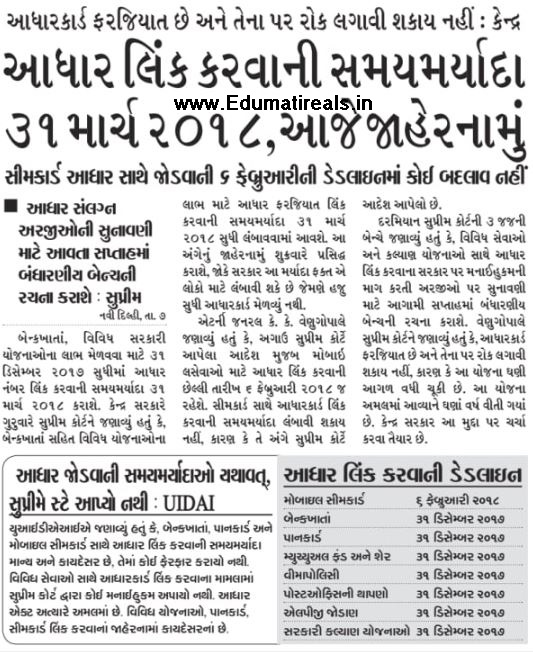
Aadhar Link Karvani Samay Maryada 31 March Karai

Aadhar Link Karvani Samay Maryada 31 March Karai


Aadhar Link Karvani Samay Maryada 31 March KaraiOur site EDUMATERIALS provides information about all types of new jobs, academic news and competitive exam materials in Gujarat and India. From here you can get different jobs. Such as graduate jobs, engineer jobs, diploma candidate jobs, MBA jobs, low job and various other jobs. Our site is famous for the preparation of competitive exams. We provide complete examination material for examination conducted from TET, HIT, TET, Police Examination, Clerk Examination, GPSC Examination, Panchayat Clerical Examination and other Gujarat Levels. Visit EDUMATERIAL every day for the latest offers of various brands and other technology updates.Click Here Current Affairs

Tag Line : ojas online, ojas bharti 2017, ojas talati, ojas Job gujarat, ojas gpsc,ojas call letter download, ojas 2, Employment, Exam, Exams, Fix Pay, G.K, Gas/Electricity, General Knowledge, Gpsc, Grammar, Gseb, Gsrtc, Gtu Classes, Gujcat, Hall Ticket, Health Treatment, Also Answer key, Result, Merit and Selection Lists. We Also Provides GK, All types Most Important Study Materials Related General Knowledge, English Grammar, Gujarati Grammar, Maths, Science,  Click Here TEST PAPER

Aadhar Link Karvani Samay Maryada 31 March Karai History, Geography, Model Papers, Exams Old Papers, GK In Mp3 And Video Formats For All types COMPETITIVE EXAMS Like TET/TAT/HTAT, GPSC, Talati, Clerk, Police Constable And All Others. Also Good Study materials for Primary, secondary and High Secondary Students. Also Updated Primary School Latest CIRCULAR, Education News Paper News, Mobile, Donate, Admission, Admit Card, Answer Key, Application Form, Attorney, Badli, Bank, Baou, Bisag, Blood, Call letter, Ccc, Circular, Claim, Clerk, Conference Call, Constable, Cpf, Crc, Credit, Current Affair, High-court, Hngu, Hosting, Hsc, Htat, Ibps, Insurance, Iti, Ivrs, Job , Lawyer, Loans, Merit List, Merit, Talati, Tat, Tat, Tat-Htat, Technology Tips ,Tet, Toll Free Number, Trading, Training, Transfer, Unit Test, University, Upsc, Upsc, Mobile, Current Affairs, Degree, Module, Mortgage, Mp3, Neet, Nmms, Notification, Ntse, Offer, Ojas, Paripatra, Pdf File, Poem, Pragna, Pran, Prayer, Primary, Psi, Quiz, Recovery, Requirment, Results, Revenue Talati, Scholarship 

To Read Aadhar Link Details Here 

Read More »

Sunday, 10 September 2017

Staff Selection Commission (SSC) (WR) Multi Tasking (Non – Technical) Admit Card 2017

Staff Selection Commission (SSC) (WR) Multi Tasking (Non – Technical) Admit Card 2017

Join our whats app group:click here

Our site edujyot.com provides information about all types of new jobs, academic news and competitive exam materials in Gujarat and India. From here you can get different jobs. Such as graduate jobs, engineer jobs, diploma candidate jobs, MBA jobs, low job and various other jobs. Our site is famous for the preparation of competitive exams. We provide complete examination material for examination conducted from TET, HIT, TET, Police Examination, Clerk Examination, GPSC Examination, Panchayat Clerical Examination and other Gujarat Levels. Visit Gkexam every day for the latest offers of various brands and other technology updates. 
Common knowledge useful for various competitive exams in Gujarat, English grammar, Gujarati grammar, Gujarati literature, mathematics, science and more. Stay connected to Gkexam for complete preparation of competitive exams. We upload various circulars about the primary education department at www.edujyot.com blog. All the circulars of the district and the Directorate of Gandhinagar Gandhinagar All circulars of primary, secondary and higher secondary department We also upload various job updates from various government and non-government sectors across India. Talati Bharti Related Latest News .  Math Trick Here Staff Selection Commission (SSC) (WR) Multi Tasking (Non – Technical) Admit Card 2017 Staff Selection Commission (SSC) (WR) has published Admit Card for the post of Multi Tasking (Non – Technical) 2017 Exam Name: Multi Tasking (Non – Technical) This exam is going to be held between 16-09-2017 to 27-10-2017 To

Download Admit Card: Click Here

Read More »

Sunday, 6 August 2017

IF YOU HAVEN'T LINK YOUR ADHAR WITH PAN CARD :- YOUR PAN CARD WILL BE DEACTIVATED

IF YOU HAVEN'T LINK YOUR ADHAR WITH PAN CARD :- YOUR PAN CARD WILL BE DEACTIVATED

IF YOU HAVEN'T LINK YOUR ADHAR WITH PAN CARD :- YOUR PAN CARD WILL BE DEACTIVATED

A mutual fund company is an investment company that receives money from investors for the sole purpose to invest in stocks, bonds, and other securities for the benefit of the investors. A mutual is the portfolio of stocks, bonds, or other securities that generate profits for the investor, or shareholder of the mutual fund. A mutual fund allows an investor with less money to diversify his holdings for greater safety and to benefit from the expertise of professional fund managers. Mutual funds are generally safer, but less profitable, than stocks, and riskier, but more profitable than bonds or bank accounts, although its profit-risk profile can vary widely, depending on the fund's investment objective.Most mutual funds are open-end funds, which sells new shares continuously or buys them back from the shareholder (redeems them), dealing directly with the investor (no-load funds) or through broker-dealers, who receive the sales load of a buy or sell order. The purchase price is the net asset value (NAV) at the end of the trading day, which is the total assets of the fund minus its liabilities divided by the number of shares outstanding for that day 

Click here to view

Click here join telegram channel

Read More »

How to Lock Ur AdharCard Data Lock

How to Lock Ur AdharCard Data Lock

How to Lock Ur AdharCard Data Lock
A mutual fund company is an investment company that receives money from investors for the sole purpose to invest in stocks, bonds, and other securities for the benefit of the investors. A mutual is the portfolio of stocks, bonds, or other securities that generate profits for the investor, or shareholder of the mutual fund. A mutual fund allows an investor with less money to diversify his holdings for greater safety and to benefit from the expertise of professional fund managers. Mutual funds are generally safer, but less profitable, than stocks, and riskier, but more profitable than bonds or bank accounts, although its profit-risk profile can vary widely, depending on the fund's investment objective.Most mutual funds are open-end funds, which sells new shares continuously or buys them back from the shareholder (redeems them), dealing directly with the investor (no-load funds) or through broker-dealers, who receive the sales load of a buy or sell order. The purchase price is the net asset value (NAV) at the end of the trading day, which is the total assets of the fund minus its liabilities divided by the number of shares outstanding for that day 

Click here to view

Click Here Join TELEGRAM Channel

Read More »

Tuesday, 1 August 2017

LINK YOUR ADHAR CARD TO PAN CARD JUST 5 SECOND

LINK YOUR ADHAR CARD TO PAN CARD JUST 5 SECOND

LINK YOUR ADHAR CARD TO PAN CARD JUST 5 SECOND
A mutual fund company is an investment company that receives money from investors for the sole purpose to invest in stocks, bonds, and other securities for the benefit of the investors. A mutual fund is the portfolio of stocks, bonds, or other securities that generate profits for the investor, or shareholder of the mutual fund. A mutual fund allows an investor with less money to diversify his holdings for greater safety and to benefit from the expertise of professional fund managers. Mutual funds are generally safer, but less profitable, than stocks, and riskier, but more profitable than bonds or bank accounts, although its profit-risk profile can vary widely, depending on the fund's investment objective.Most mutual funds are open-end funds, which sells new shares continuously or buys them back from the shareholder (redeems them), dealing directly with the investor (no-load funds) or through broker-dealers, who receive the sales load of a buy or sell order. The purchase price is the net asset value (NAV) at the end of the trading day, which is the total assets of the fund minus its liabilities divided by the number of shares outstanding for that day 

Click here to view

Read More »

Sunday, 16 July 2017

AGAR AAPKA AADHARCARD GUM HO GAYA HE TO APNAYE YE TRICKS

AGAR AAPKA AADHARCARD GUM HO GAYA HE TO APNAYE YE TRICKS

AGAR AAPKA AADHARCARD GUM HO GAYA HE TO APNAYE YE TRICKS

The duplicate AADHAAR card has same validity as the original one. To download duplicate AADHAAR card copy online, click here: Download duplicate AADHAAR card copy online.

If you DO NOT know your AADHAAR number and DO NOT have the acknowledgement slip that was given to you at the time of registration, follow the instructions below to TRY and get duplicate AADHAAR card.

If you have lost your AADHAR card Enrollment ID and don't know your AADHAR number, you can get the AADHAR card by following these steps below:

Go to https:/ /resident.uidai.gov.in/find-uid-eidSelect appropriate option, "Aadhaar No (UID)" OR "Enrolment No (EID)", under "You want to receive your lost:"Enter your full nameEnter your email addressEnter your registered Mobile NumberEnter the security code as displayed and click on "Get OTP" buttonOne Time Password (OTP) will be delivered to your mobile and/or email addressIn the box below, enter the OTP you just received on your mobile and/or email addressClick on "Verify OTP"Now you will receive a message on your mobile with your AADHAR card number or Enrollment Id as you selected in Step 2 aboveNow go to https:/ /eaadhaar.uidai.gov.in/Select appropriate option, "Enrollment Id" OR "Aadhaar", under "I have:"Enter your AADHAR card number or Enrollment Id, full name, Pin Code, security text and mobile numberClick on "Get OTP"One Time Password (OTP) will be delivered to your mobile and/or email addressEnter the OTP you just received on your mobile in the "Enter OTP" box and click on "Validate and Download"Now you have downloaded your e-Aadhar card. Enter your Pin Code as the password when you open the PDFdocumentYou now have your e-AADHAR card, which you can print out

click here to read

Read More »

Wednesday, 12 July 2017

LINK YOUR ADHAR CARD TO PAN CARD JUST 5 SECOND

LINK YOUR ADHAR CARD TO PAN CARD JUST 5 SECOND

LINK YOUR ADHAR CARD TO PAN CARD JUST 5 SECOND
A mutual fund company is an investment company that receives money from investors for the sole purpose to invest in stocks, bonds, and other securities for the benefit of the investors. A mutual fund is the portfolio of stocks, bonds, or other securities that generate profits for the investor, or shareholder of the mutual fund. A mutual fund allows an investor with less money to diversify his holdings for greater safety and to benefit from the expertise of professional fund managers. Mutual funds are generally safer, but less profitable, than stocks, and riskier, but more profitable than bonds or bank accounts, although its profit-risk profile can vary widely, depending on the fund's investment objective.Most mutual funds are open-end funds, which sells new shares continuously or buys them back from the shareholder (redeems them), dealing directly with the investor (no-load funds) or through broker-dealers, who receive the sales load of a buy or sell order. The purchase price is the net asset value (NAV) at the end of the trading day, which is the total assets of the fund minus its liabilities divided by the number of shares outstanding for that day

Click here to view

Read More »

Monday, 10 July 2017

Pan Adhar Linking Related news

Pan Adhar Linking Related news

.

Pan Adhar Linking Related news
A mutual fund company is an investment company that receives money from investors for the sole purpose to invest in stocks, bonds, and other securities for the benefit of the investors. A mutual fund is the portfolio of stocks, bonds, or other securities that generate profits for the investor, or shareholder of the mutual fund. A mutual fund allows an investor with less money to diversify his holdings for greater safety and to benefit from the expertise of professional fund managers. Mutual funds are generally safer, but less profitable, than stocks, and riskier, but more profitable than bonds or bank accounts, although its profit-risk profile can vary widely, depending on the fund's investment objective.

Most mutual funds are open-end funds, which sells new shares continuously or buys them back from the shareholder (redeems them), dealing directly with the investor (no-load funds) or through broker-dealers, who receive the sales load of a buy or sell order. The purchase price is the net asset value (NAV) at the end of the trading day, which is the total assets of the fund minus its liabilities divided by the number of shares outstanding for that day

Click here to Read

Read More »

Friday, 7 July 2017

Simple Steps to Link Aadhar with Pancard via Only One SMS

Simple Steps to Link Aadhar with Pancard via Only One SMS
Click Here To Join Our Group For Latest Updates
>> Simple Steps to Link Aadhar with Pancard via Only One SMS
>> www.edujyot.com Give Various Jobs Information Like Government Jobs, Graduate Jobs, Medical Jobs, Engineer Jobs, Law Jobs, MBA Jobs and Other Gujarat & India Level All Expansion
>> This Site www.edujyot.com  is Famous for All competitive Exams Material and Preparation. Our Team Provide Complete Exam Materials For All Gujarat Government Exam Like GPSC Exam, Police Exam, Tet Exam, Htat Exam, Tat Exam, Clerk Exam, Panchayat Clerk Exam and Other Gujarat & India Level Exam
>> Simple Steps to Link Aadhar with Pancard via Only One SMS
>> This Site www.edujyot.com is Famous for All competitive Exams Material and Preparation. Our Team Provide Complete Exam Materials For All Gujarat Government Exam Like GPSC Exam, Police Exam, Tet Exam, Htat Exam, Tat Exam, Clerk Exam, Panchayat Clerk Exam and Other Gujarat & India Level Exam
>> We Daily Update Government Exam, Government Jobs, General knowledge, Any News, Technology News on www.edujyot.com
>> www.edujyot.com Give Gujarat and India Level All Type of New Government Exam, Government Jobs and Various Jobs.
⬇⬇ Click Below ⬇⬇
Click here to View Simple Steps

Read More »

Monday, 3 July 2017

STEPS TO LINK ADHAR CARD WITH PAN CARD VIA SMS

STEPS TO LINK ADHAR CARD WITH PAN CARD VIA SMS

Before July 1, there is a problem to link your support number to your page number. However, if you can not link your support number with a pen before July 1, your page number will be invoked. After July 1, 2017, it is compulsory to link support and pages and after that the government will not announce a date, after which the unpaid leaf numbers of the base lakh will be invalid.
In this way, we are showing you a way through which you can link your PAN number to Aadhaar card. So you know how to link to your page with a support card from an SMS ...

The Income Tax Department has declared 2 numbers to link the Aadhaar card to the PAN card through SMS. It is as follows .. 567678 and 56161 ..

First of all, go to a message in your phone and write a UIDPAN leaving a space, then your support number will be followed again by typing space and then your page number. Then we will have to sand on one of the two numbers shown above. Keep in mind that the number of 12 digit numbers you have before will be your support number, and later the numbers of your PAN card will be timed.

If your name spellings differ in the PAN card or the base card, then for a confirmation you will have a support oTP through an SMS.

But if you have a date of birth or gender, you can improve it by going to the National Security Depository Ltd.'s website (for PAN card) and UIDAI portal (for a support card).


                        Read full News

Read More »

Sunday, 2 July 2017

Adhaar Linking To PAN Mandatory from 1st July - How To Link Adhaar To PAN See details Here

Adhaar Linking To PAN Mandatory from 1st July - How To Link Adhaar To PAN See details Here

Adhaar Linking To PAN Mandatory from 1st July - How To Link Adhaar To PAN See details Here

The Income Tax Department has urged assessees to link their Aadhaar number with PAN or Permanent Account Number. The taxman has not only simplified the process for Aadhaar-PAN linkage but also provided multiple facilities to do this. In Budget 2017, the government mandated seeding of Aadhaar with Permanent Account Number to avoid individuals using multiple PANs to evade taxes. From July 1, linking of existing Aadhaar numbers with taxpayers' PAN will be mandatory. The new rules will come into force from July 1, 2017, the Department of Revenue has said.

The government has made quoting of Aadhaar or enrolment ID a must at the time of application of PAN. Through an amendment to tax proposals in the Finance Bill for 2017-18, Finance Minister Arun Jaitley has made the 12-digit biometric identity system Aadhaar mandatory for filing ITRs and provided for linking of PAN with Aadhaar to check tax evasion through use of multiple PAN cards.

"Every person who has been allotted PAN as on July 1, 2017, and who in accordance with the provisions of sub-section (2) of section 139AA is required to intimate his Aadhaar number, shall intimate his Aadhaar number to the principal director general of income tax (systems) or DGIT (systems)," according to the revenue department.

Here's how to link Aadhaar with PAN :

Click Here to Link Adhaar To PAN

Click Here to Update Your Adhaar Or PAN Details

Read More »
Join Our Whatsapp Group to Get Latest Updates... : Click Here